Why Indian Brands Need Three Models
Indian shoppers commit in different ways. Some will pay for three months today if the price is right. Some want to see the second box before they trust you. Some just want it to arrive.
A single "subscribe and save" button can't serve all three. So the brands that run subscriptions well in India offer prepaid, pay-as-you-go and AutoPay on UPI and cards side by side.
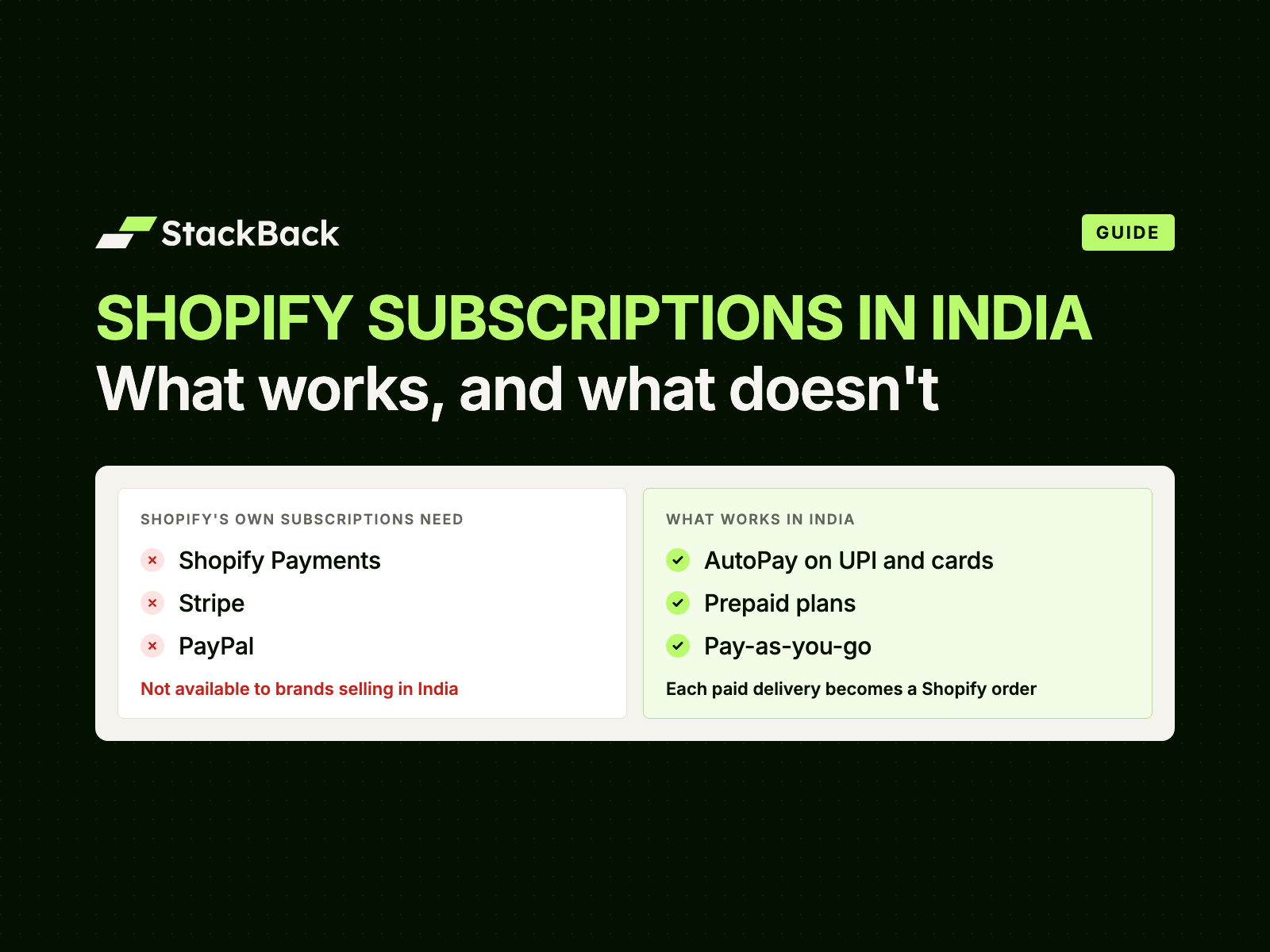
There's a second reason. Shopify's own subscriptions charge only through Shopify Payments, Stripe, PayPal and a few similar gateways. None of them are available to brands selling in India. Our guide to Shopify subscriptions in India explains why. This guide is about choosing between the three models that do work.
How Each Model Works
Prepaid
For the customer. They pick a plan, say 3 monthly deliveries, and pay once. Deliveries 2 and 3 ship on schedule, with nothing more to pay.
For you. The plan goes into the cart like any other product. It's bought on your Shopify checkout or any quick checkout, with whichever Indian payment gateway you've connected. Plans of 3, 6 or 12 deliveries are common.
Pay-As-You-Go
For the customer. They pay for the first delivery at checkout. Before each later delivery, they get a payment link by email. They pay, and it ships.
For you. It's bought the same way as prepaid, on Shopify checkout or a quick checkout. Nothing is charged automatically. That makes it the easiest start for first-time subscribers and buyers who usually pay cash on delivery.
AutoPay on UPI and Cards
For the customer. On StackBack's subscription checkout, they pay for the first delivery and set up AutoPay in the same step. They approve with their UPI PIN, or with a credit or debit card that supports e-mandates. Before each charge, they get a notice 48–72 hours ahead, with a link to manage the subscription.
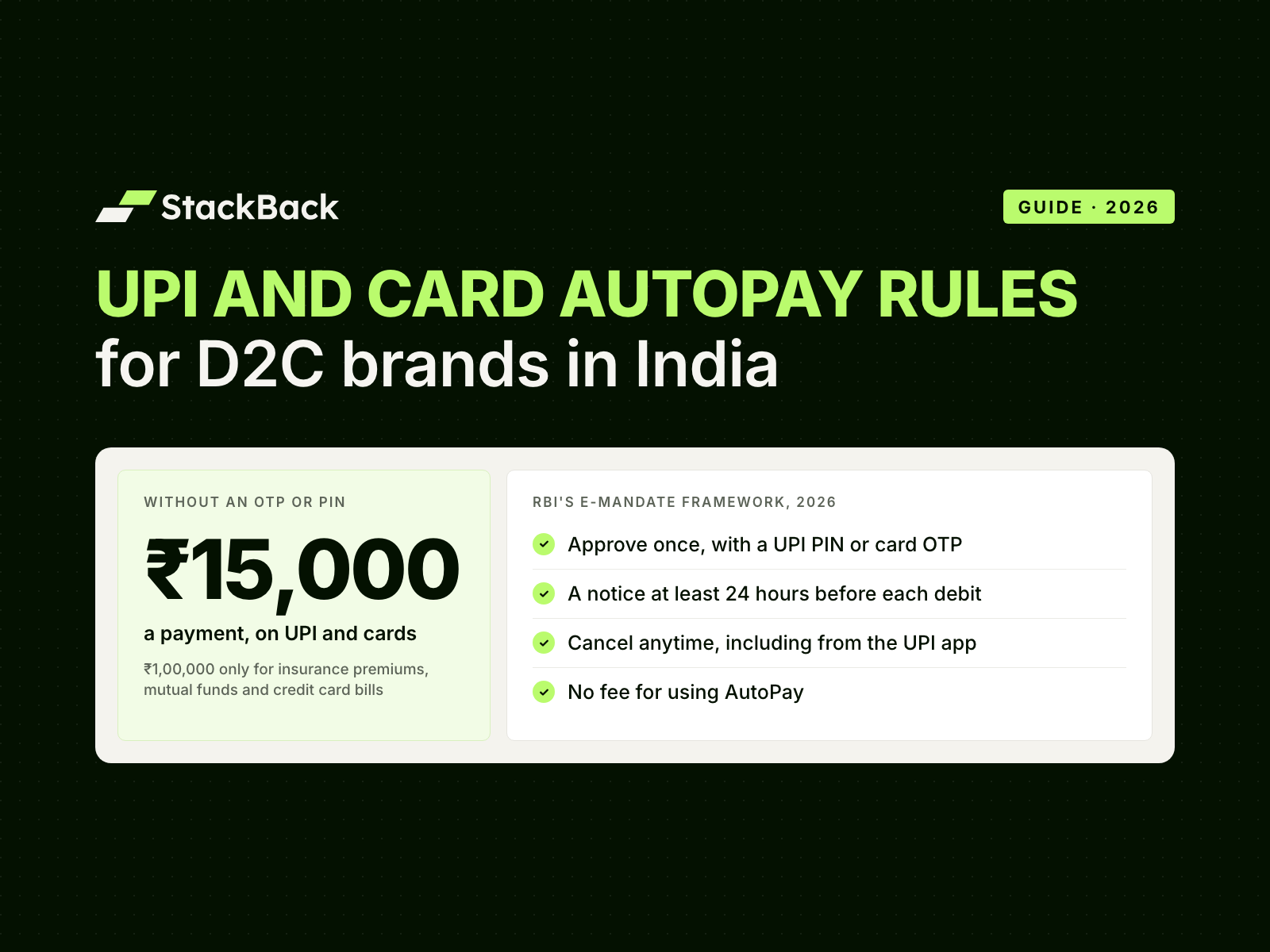
For you. Each payment is collected through your own Razorpay, Cashfree, PayU or PhonePe account, and settles with you. Payments up to ₹15,000 go through without an OTP. Customers can pause or cancel from your portal or their UPI app. More on AutoPay on UPI and cards.
AutoPay vs Prepaid vs Pay-As-You-Go at a Glance
| Prepaid | Pay-as-you-go | AutoPay on UPI and cards | |
|---|---|---|---|
| Who pays when | Once, upfront, for every delivery in the plan | Before each delivery, through a payment link | For delivery 1 at sign-up; each later payment is collected on schedule after a notice |
| Where it's bought | Shopify checkout or any quick checkout | Shopify checkout or any quick checkout | StackBack's subscription checkout, on your own gateway account |
| Payment methods | Whatever your checkout takes: UPI, cards, net banking, wallets, EMI, and COD if you allow it | Whatever your checkout takes for delivery 1; a payment link before each later delivery | UPI, approved in the customer's UPI app, or a credit or debit card that supports e-mandates |
| Cash in hand | All of it on day one | One delivery at a time, only when the customer pays | One delivery at a time, on a known date |
| Customer commitment | Highest: several deliveries paid upfront | Lowest: decides again before every delivery | Medium: approves once, can pause or cancel anytime |
| Main churn risk | The end of the plan | An unpaid link | A failed payment or a cancelled mandate |
| Best for | Loyal buyers, gifting, boxes above ₹15,000, your best discount | First-time subscribers, COD-first buyers, new products | Everyday refills: coffee, atta, protein, pet food, milk |
Not Sure Which Model Fits Your Products?
Tell us what you sell. We'll suggest which models and discounts to offer, and our team sets them up in 2 days.
Cash Flow: When the Money Arrives
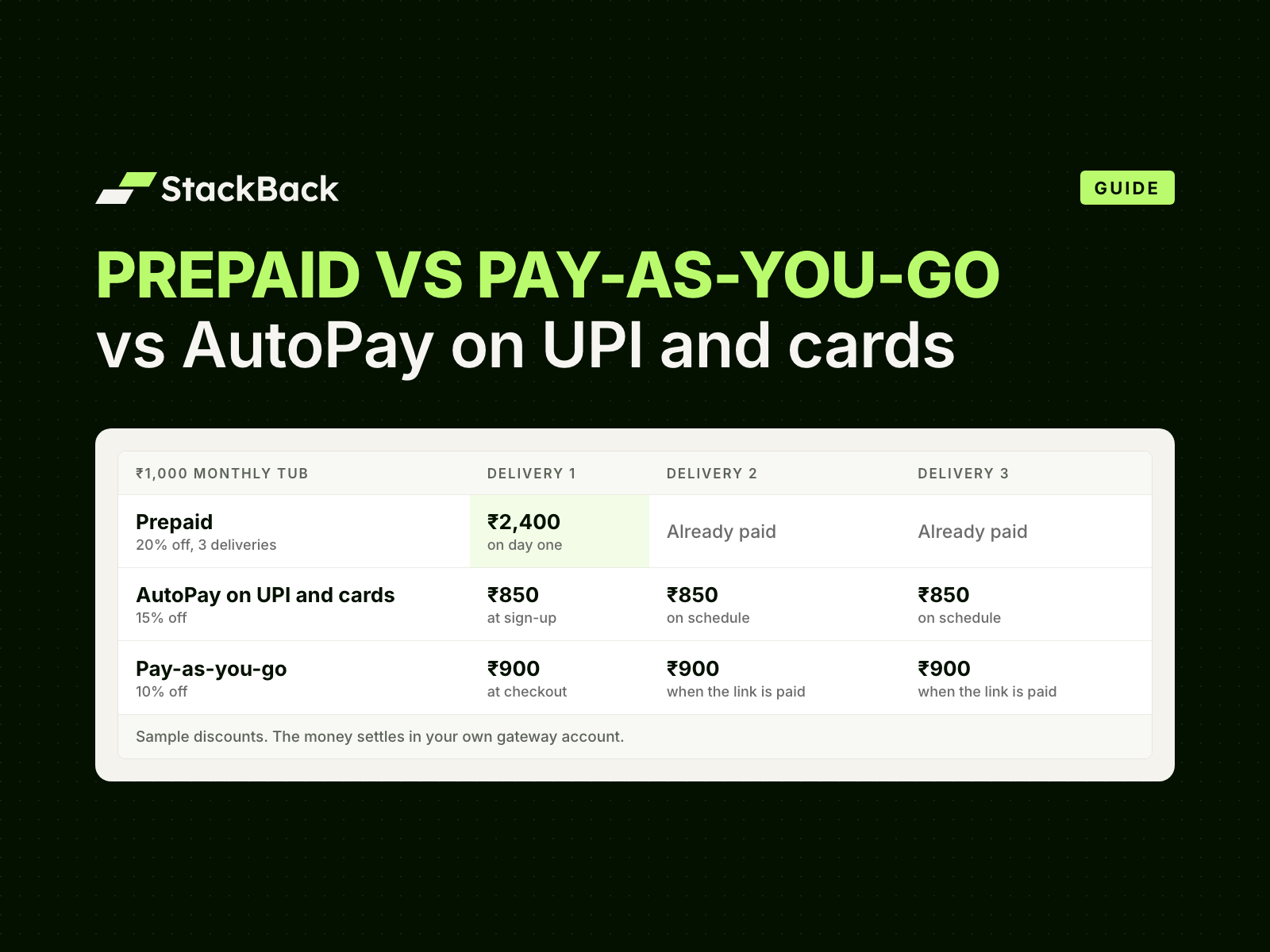
Take a ₹1,000 monthly tub of protein. With sample discounts:
- Prepaid, 3 deliveries at 20% off: ₹2,400 on day one.
- AutoPay at 15% off: ₹850 a month, collected on schedule.
- Pay-as-you-go at 10% off: ₹900 a month, whenever the customer pays the link.
Prepaid puts the most cash in your account first. That helps if you buy stock in bulk. But the deliveries are owed. Plan stock for the full term, and set a clear refund policy for a customer who stops midway.
AutoPay is the most predictable. You know the date and amount of every payment in advance. The leak is a failed payment, which is why retries matter.
Pay-as-you-go is the least predictable. Cash arrives only when the customer acts, one delivery at a time.
Whichever model a customer picks, the money settles in your own gateway account on its usual schedule.
Discounts That Fit Each Model
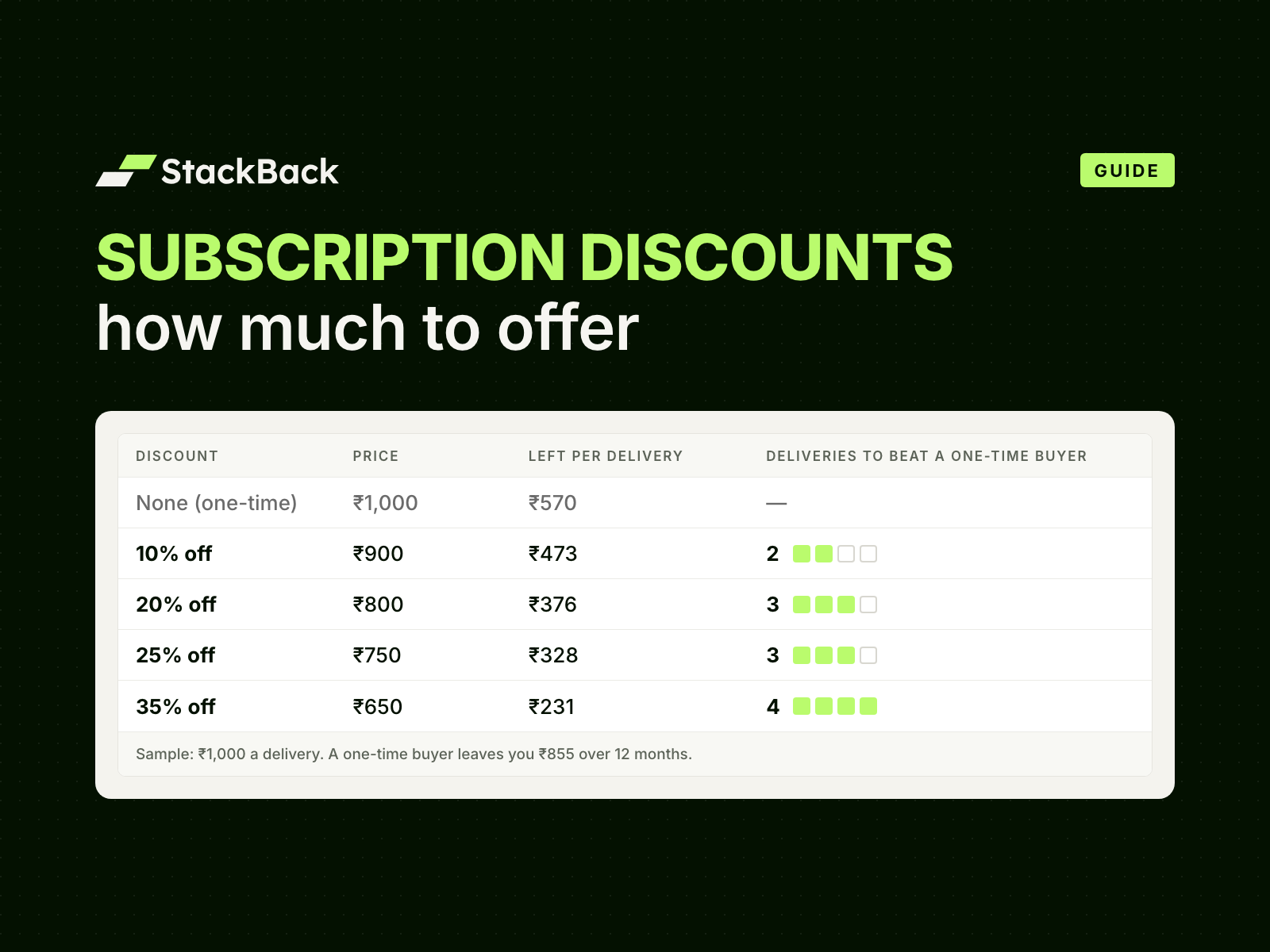
Let the discount follow the commitment. The more the customer commits, and the less you have to chase, the more you can give.
- Prepaid usually gets the biggest discount. The cash is upfront and there's nothing to collect later. The Stack runs prepaid plans on its supplements at 35% off.
- AutoPay earns a strong discount too, because it keeps paying without reminders. MillD runs monthly AutoPay on its high-protein atta at 33% off.
- Pay-as-you-go can match prepaid when you want cautious buyers in. Rosier Foods runs prepaid and pay-as-you-go on its high-protein oats at 25% off.
Two rules keep the maths honest:
- Work out the margin per delivery: price, minus discount, gateway fee, shipping and product cost. A discount that loses money on every box isn't an offer.
- Don't make pay-as-you-go cheaper than AutoPay. You'd be paying customers to pick the model that's easiest to drop.
Freebies work on every model. A sample on the 2nd delivery and a gift on the 7th reward staying, not just signing up.
Their results on StackBack: MillD sees a 4.2× LTV expansion and a 1.4× AOV lift. The Stack sees 4.8× LTV and a 26% AOV lift. Rosier Foods sees 3× LTV and a 20% AOV lift.
How Subscribers Churn on Each Model
Prepaid. Customers rarely leave mid-plan, because they've already paid. The risky moment is the last delivery. If nobody offers the next plan, the subscription simply ends. Message them before the last box, with the next plan ready to buy.
Pay-as-you-go. Every payment link is a fresh decision. Most churn here is silence: the link goes unpaid and nothing ships. Clear reminders help. So does inviting regular payers to move to AutoPay after delivery 2.
AutoPay. The customer does nothing to keep it going, so it carries on. Churn comes from two places:
- A failed payment: a low balance, an expired card, or a box above the AutoPay limit.
- A cancelled mandate: the customer stops it in their UPI app.
A notice before each charge, and a portal where skipping is easier than cancelling, answer most of it.
Which Products Suit Which Model
Two things decide it: how often the product runs out, and what one delivery costs.
- Weekly or fortnightly refills (milk, coffee, juices): AutoPay. A payment link every week wears customers out. See how coffee brands set this up.
- Monthly refills under ₹15,000 (protein, atta, ghee, pet food, diapers): AutoPay as the default, with a 3-month prepaid plan as the best value.
- Boxes above ₹15,000 a delivery: prepaid. Above that amount, AutoPay needs the customer to authenticate every payment.
- Gift and festive boxes: prepaid. One payment covers the whole run.
- New products and COD-heavy audiences: pay-as-you-go. It lets people try the rhythm before they commit.
How to Run All Three Side by Side
- One product page, one choice. Show one-time purchase and the three plans in one widget, under the price and above the buy button. Keep one-time visible.
- Name plans after what the customer gets. "3-Month Subscription" beats "3x Prepaid". Our first 100 subscribers playbook has the naming rules.
- Explain each model in three lines. What they pay today, what happens before each delivery, and how to stop.
- Use one customer portal for all three. Customers skip, pause, swap products or flavours, change frequency, add products to upcoming deliveries, and cancel.
- Keep your checkout. Prepaid and pay-as-you-go check out on Shopify checkout or any quick checkout. That covers GoKwik, Shopflo, Shiprocket Checkout, Razorpay Magic Checkout, Cashfree and FlexyPe. AutoPay checks out on StackBack's subscription checkout. One-time orders stay where they are.
- Keep ops the same. A subscription order appears in Shopify once that delivery is due and paid, tagged Subscription. Your team fulfils it like any other order.
- Move people up over time. Invite regular pay-as-you-go payers to AutoPay. Offer loyal AutoPay customers a prepaid plan at a better price.
Cash on delivery works for subscriptions too. We still advise keeping subscriptions prepaid, because a COD box can be refused at the door.
What Happens When an AutoPay Payment Fails
Payments fail for ordinary reasons: a low balance, an expired card, a bank outage. On StackBack, this is the sequence:
- The customer gets a notice 48–72 hours before the charge, so they can top up, skip or pause.
- If the charge fails, it's retried.
- After 3 failed retries, the subscription pauses or moves to pay as you go, whichever the brand chooses. It isn't cancelled.
- The customer gets a payment link for that delivery, and a nudge to turn AutoPay back on.
- Nothing ships unpaid. The order appears in Shopify only once the delivery is paid.
The customer keeps their subscription, and nobody on your team has to chase them.
How StackBack Handles This
StackBack is the subscription & repeat-revenue platform for Indian D2C brands on Shopify. It runs prepaid, pay-as-you-go and AutoPay on UPI and cards side by side, on single products, bundles and build-your-own boxes. Each customer picks the model that suits them, and every payment settles in your own gateway account.
Integrate StackBack with your Shopify store, and our team sets up your plans, discounts and portal. We take you live in 2 days. Plans start at ₹4,500/month, with 0% transaction fees. See subscriptions on StackBack.
Frequently Asked Questions
What's the difference between prepaid and pay-as-you-go subscriptions?
Prepaid collects the full amount for several deliveries upfront. Pay-as-you-go collects payment before each delivery, through a payment link. Prepaid usually carries the bigger discount; pay-as-you-go asks for less commitment.
Is AutoPay better than prepaid?
Neither is better for every customer. AutoPay suits everyday refills, because the customer approves once and payments carry on. Prepaid suits loyal buyers, gifts and boxes above ₹15,000, and brings the cash in first. Most brands offer both.
Can I offer prepaid, pay-as-you-go and AutoPay on the same product?
Yes. With StackBack, all three sit in one widget on the product page, each with its own discount. They also work on bundles and build-your-own boxes.
Which subscription model should get the biggest discount?
Usually prepaid, because the cash is upfront. AutoPay comes next. Keep pay-as-you-go at or below the others, so you don't reward the model that's easiest to drop.
What happens if an AutoPay payment fails?
On StackBack, it's retried. After 3 failed retries, the subscription pauses or moves to pay as you go, whichever the brand chooses. On pay as you go, the customer gets a payment link. Nothing ships until it's paid.
Can customers subscribe with cash on delivery?
StackBack supports COD subscriptions, but we advise keeping subscriptions prepaid. A COD box can be refused at the door, which costs you shipping both ways.
Is there a limit on AutoPay payments?
Yes. Under RBI's rules, AutoPay payments up to ₹15,000 go through without an OTP. Above that, the customer authenticates each payment, so sell high-value boxes as prepaid.
Offer All Three on Your Shopify Store
Prepaid, pay-as-you-go and AutoPay on UPI and cards, side by side. Our team sets up your plans and takes you live in 2 days.
Sources: Reserve Bank of India, Digital Payments – E-mandate Framework, 2026, 21 April 2026 · Shopify Help Center, Shopify Subscriptions: considerations, checked 15 October 2026