How subscriptions work on Shopify
Shopify sells subscriptions through selling plans. A product gets a subscribe-and-save option, the customer picks a delivery frequency at checkout, and Shopify stores their payment method. On each renewal date, the subscription app asks Shopify to charge that stored payment method and create a new order.
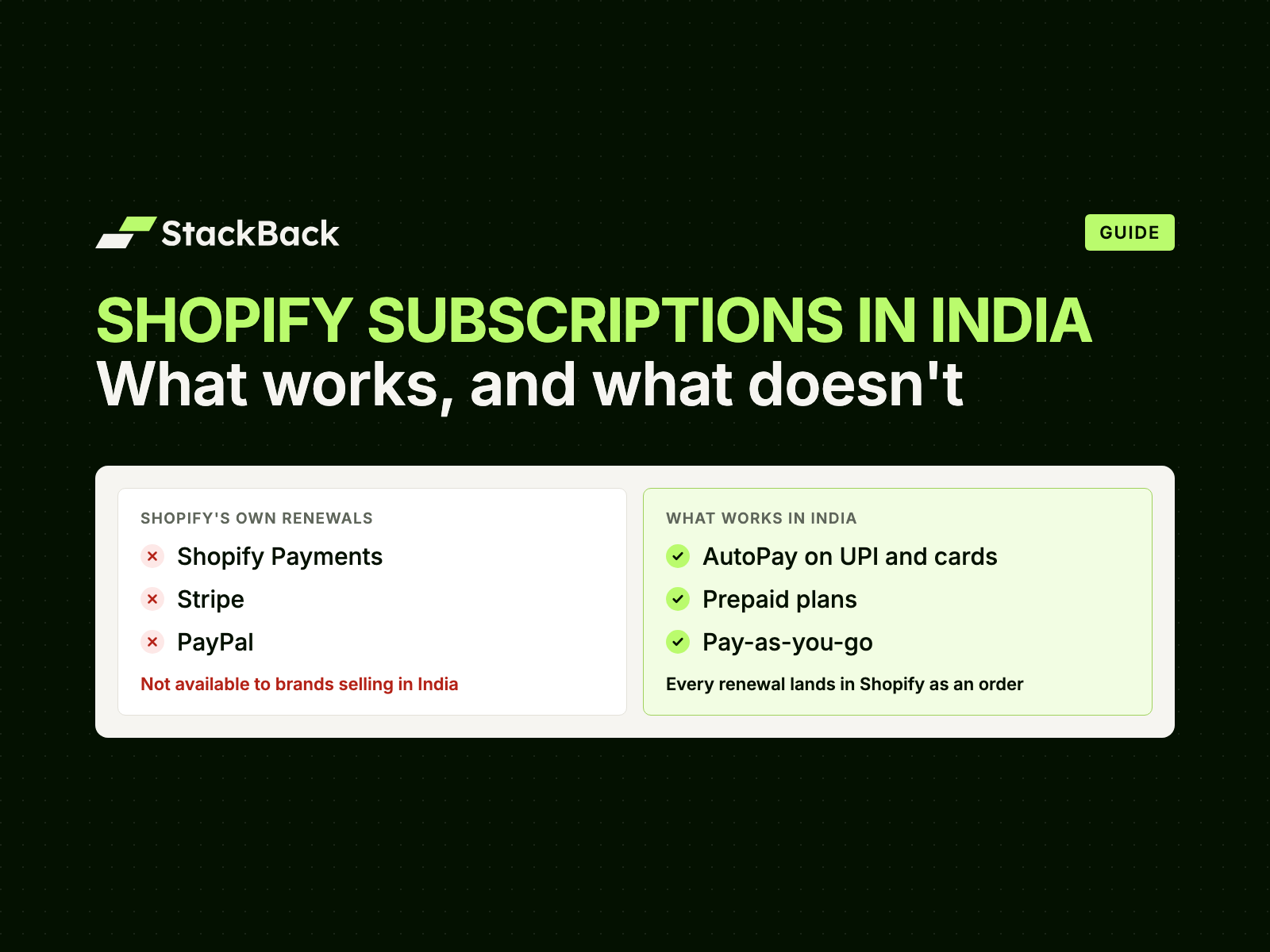
That last step is the catch. Shopify can only charge a stored payment method through the gateways that support it, and its help centre lists them: Shopify Payments, Stripe, PayPal and a few others.
SHOPIFY'S OWN RENEWALS
- Shopify Payments
- Stripe
- PayPal
Not available to brands selling in India
STACKBACK RENEWALS


AutoPay on UPI and cards
Why renewals break for Indian brands
- Shopify Payments isn't available in India. Indian Shopify stores take payments through third-party gateways such as Razorpay, Cashfree, PayU and PhonePe Payment Gateway. They work well for one-time orders, but Shopify can't use them to charge a saved card or UPI ID for a renewal.
- Stripe and PayPal aren't an option either. Stripe is invite-only for Indian businesses, and PayPal India can't receive domestic payments, only payments from abroad.
- India's rules need a mandate. RBI requires automatic recurring charges on cards and UPI to run on a registered e-mandate: the customer approves once, gets a notice before each charge, and can cancel at any time. A card saved at checkout isn't a mandate.
So the global apps, and Shopify Subscriptions itself, do the only thing they can. On each renewal they send the customer an invoice or payment link and wait. Every renewal becomes a fresh buying decision, and subscribers drop off at each one.
RECURRING INVOICES BY EMAIL
- 14 Oct · renewal due
- Email: “Pay ₹849 to get your next delivery”
- Customer pays the link, or forgets
Every renewal waits on the customer
STACKBACK · AUTOPAY ON UPI AND CARDS
- 12 Oct · notice before the charge
- 14 Oct · ₹849 charged on UPI
- Order #1048 created in Shopify
Renews automatically
The three subscription models that work in India
Indian brands that run subscriptions well usually offer more than one model, because shoppers differ in how much they want to commit.
| AutoPay on UPI and cards | Prepaid | Pay-as-you-go | |
|---|---|---|---|
| How the customer pays | Pays for the first delivery and sets up AutoPay in the same step; every renewal after that is charged automatically | Once, upfront, for several deliveries | A payment link before each delivery |
| Best for | Everyday refills: coffee, protein, pet food, dairy | Loyal customers, gifting, high-value boxes | Cautious first-time subscribers |
| Where it's bought | StackBack's subscription checkout, on your own Razorpay account | Your Shopify checkout or any quick checkout | Your Shopify checkout or any quick checkout |
| Watch out for | RBI's ₹15,000 limit on automatic charges | Refunds if a customer stops midway | Every link is a chance to drop off |
AutoPay on UPI and cards
RENEWS ITSELFPays for delivery 1 and sets up AutoPay in one step
₹849 every 2 weeks, charged automatically
Prepaid
3 deliveries paid upfront
₹2,165 once · save 15%
Pay-as-you-go
A payment link before each delivery
₹849 when they pay the link
AutoPay on UPI and cards. The customer buys on StackBack's subscription checkout, through the brand's own Razorpay account. In one step they pay for the first delivery and set up AutoPay on UPI or a card, with nothing extra to do beyond the purchase. Before each renewal they get a notice, then the charge goes through automatically and the money settles with the brand. More on AutoPay on UPI and cards.
Prepaid. The customer pays once for a set number of deliveries, say three months of coffee. The cash comes in upfront, there's nothing to collect later, and it suits boxes above the AutoPay limit. It's usually where the biggest discount goes.
Pay-as-you-go. Before each delivery, the customer gets a payment link on WhatsApp, SMS or email. Nothing is charged automatically, so it's the easiest yes for a first-time subscriber. Reminders and a good customer portal matter most here.
What RBI's rules mean for AutoPay
- One approval, then automatic. The customer authenticates once, when they pay for the first delivery and set up AutoPay.
- A notice before every charge. RBI's E-mandate Framework, 2026 requires a notice at least 24 hours before each charge. StackBack sends it 48 to 72 hours ahead.
- A limit on automatic charges. For most product categories, a charge above ₹15,000 needs the customer to authenticate it. For boxes above that, offer prepaid.
- Customers can cancel at any time, from their UPI app or bank, or from your customer portal.
- Some charges fail. A low balance or an expired card stops a charge. StackBack retries up to 3 times, then pauses the subscription instead of cancelling it.
Shopify checkout or a quick checkout
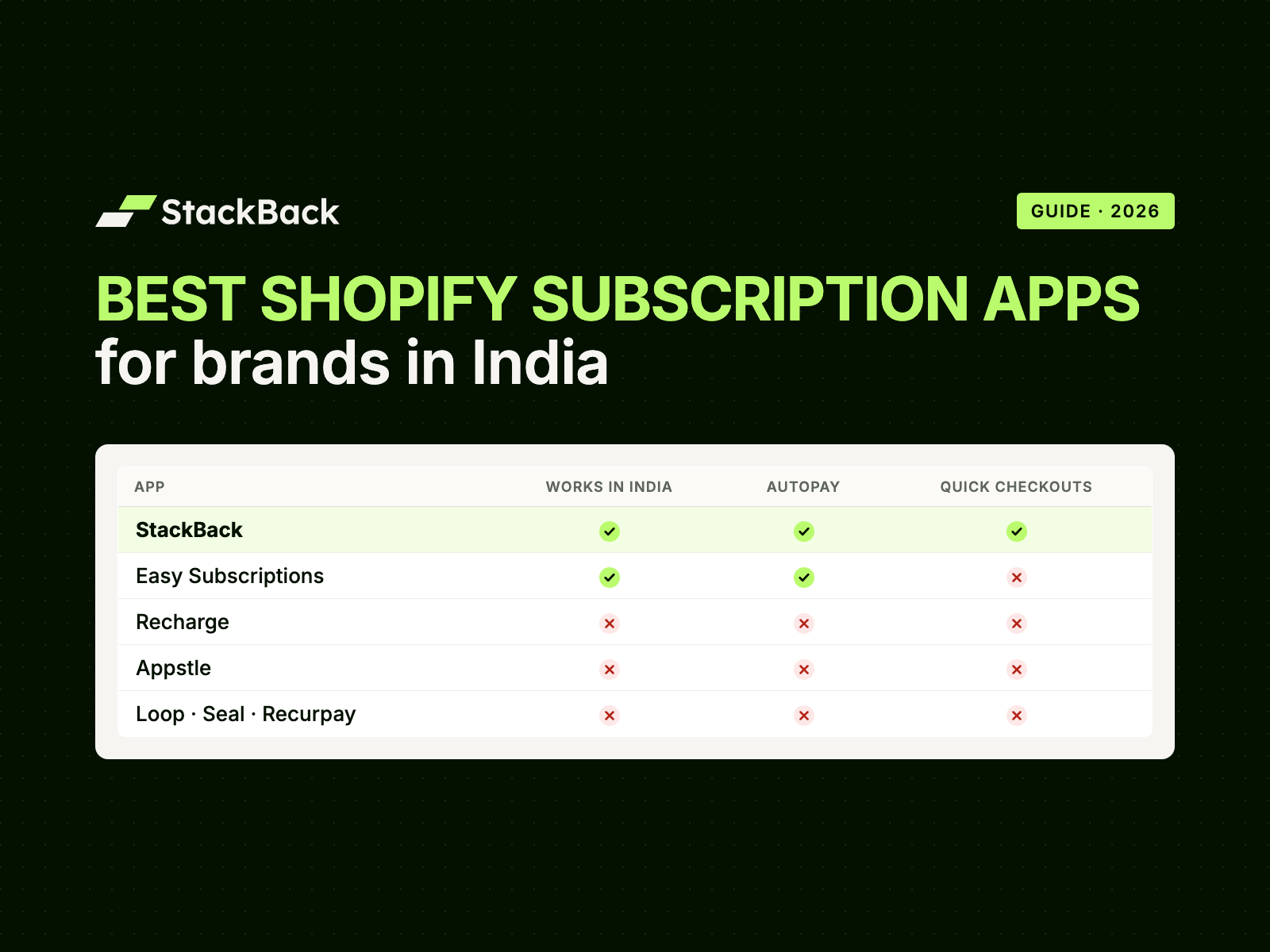
Many Indian brands sell through a quick checkout such as GoKwik, Shopflo, Shiprocket Checkout, Razorpay Magic Checkout, Cashfree or FlexyPe. With StackBack, a prepaid or pay-as-you-go subscription goes into the cart like any other product. It checks out on whatever you already use, Shopify checkout or a quick checkout, with whichever gateway you've connected.
AutoPay works differently: it's bought on StackBack's own subscription checkout, through your Razorpay account. The customer pays for the first delivery and sets up the AutoPay mandate in the same step, with no extra steps beyond the purchase, and every renewal after that is charged automatically. See subscriptions via quick checkouts.
How to launch subscriptions on Shopify in India
- Pick the products people reorder. Anything bought every 2 to 8 weeks: coffee, tea, protein, pet food, dairy, skincare refills, diapers.
- Choose your models and discounts. Start with prepaid and AutoPay, and add pay-as-you-go for cautious buyers. A prepaid plan can carry a bigger discount than a monthly AutoPay plan, because the cash comes in upfront.
- Set the cadence. Weekly for milk, fortnightly for coffee, monthly for supplements. Let customers change it themselves in the portal.
- Put the offer where shoppers decide. A subscription widget on the product page, a landing page for the offer, and a line in your WhatsApp and email flows.
- Plan for retention from day one. Reminders before each renewal, a portal where customers can skip, swap or pause instead of cancelling, and automatic retries for failed charges.
- Check your operations. Every renewal should arrive in Shopify as a normal order, so your OMS, 3PL, invoices and reports need no change.
With StackBack, our team sets up steps 2 to 6 with you and takes you live in 2 days.
Frequently asked questions
Does Shopify Subscriptions work in India?
You can install it, but it can't charge renewals automatically for brands selling in India. It renews only through Shopify Payments, Stripe, PayPal and a few similar gateways, and none of them are available to brands selling in India.
Is Shopify Payments available in India?
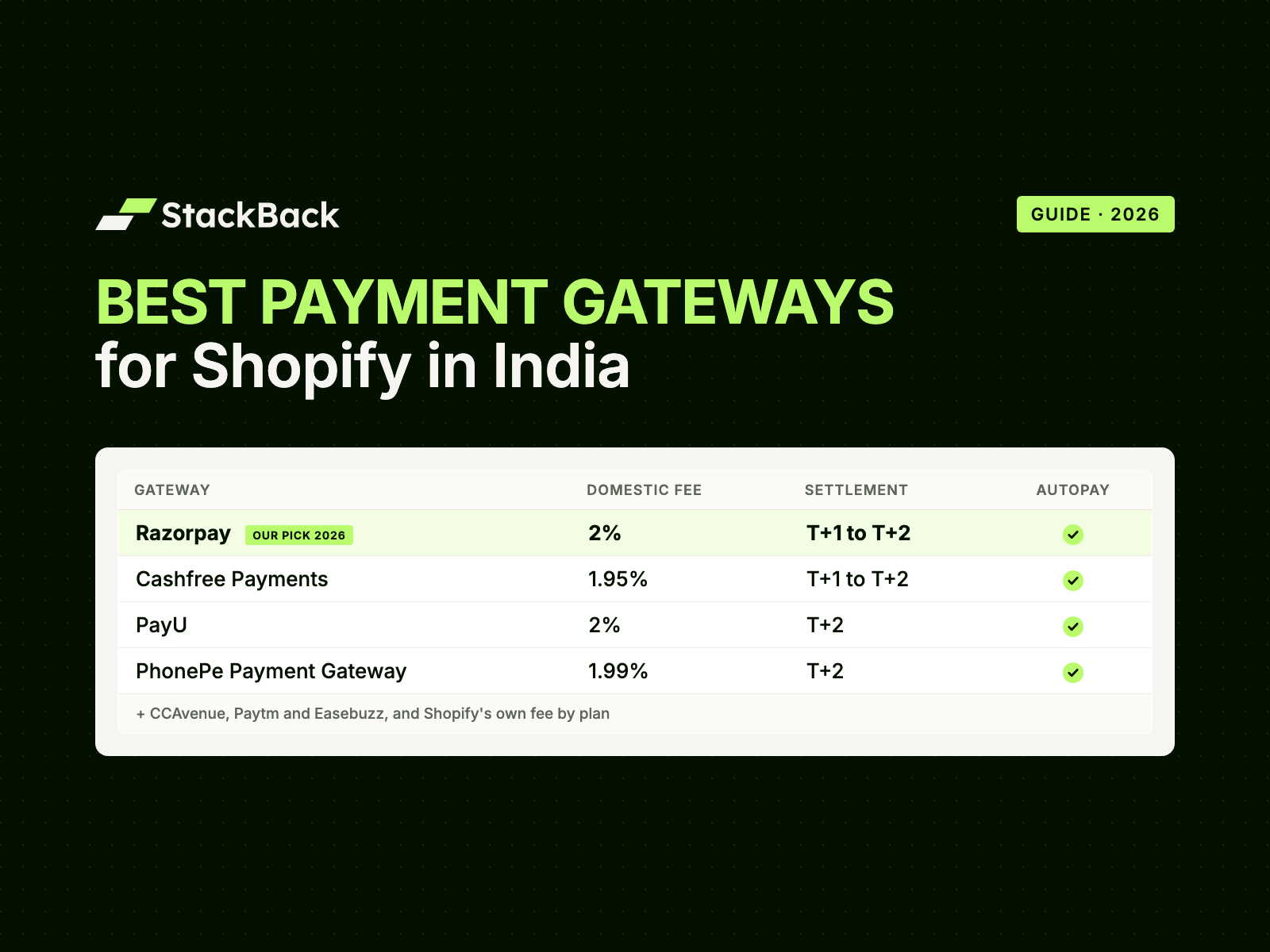
No. Indian Shopify stores take payments through third-party gateways such as Razorpay, Cashfree, PayU and PhonePe Payment Gateway. See our guide to the best payment gateways for Shopify in India.
Can I offer UPI AutoPay on Shopify?
Yes, with a subscription platform that runs AutoPay on Indian payment rails. With StackBack, the customer buys on StackBack's subscription checkout through your Razorpay account, paying for the first delivery and setting up AutoPay on UPI or a card in one step. Each renewal then arrives in Shopify as a normal order.
Can customers subscribe with cash on delivery?
StackBack supports COD subscriptions, but we advise keeping subscriptions prepaid. A COD renewal can be refused at the door, which costs you shipping both ways.
Do subscriptions work with GoKwik or Shopflo?
With StackBack, yes, for prepaid and pay-as-you-go plans. The subscription goes into the cart like any product and checks out on your quick checkout. AutoPay plans are bought on StackBack's own subscription checkout, through your Razorpay account.
What does it cost to run subscriptions?
Your gateway's fee on each payment, plus your subscription platform. StackBack plans start at ₹4,500/month, with 0% transaction fees on every plan.
Run subscriptions the way India pays
AutoPay on UPI and cards, prepaid and pay-as-you-go, on your Shopify store. Our team takes you live in 2 days.