Before You Start
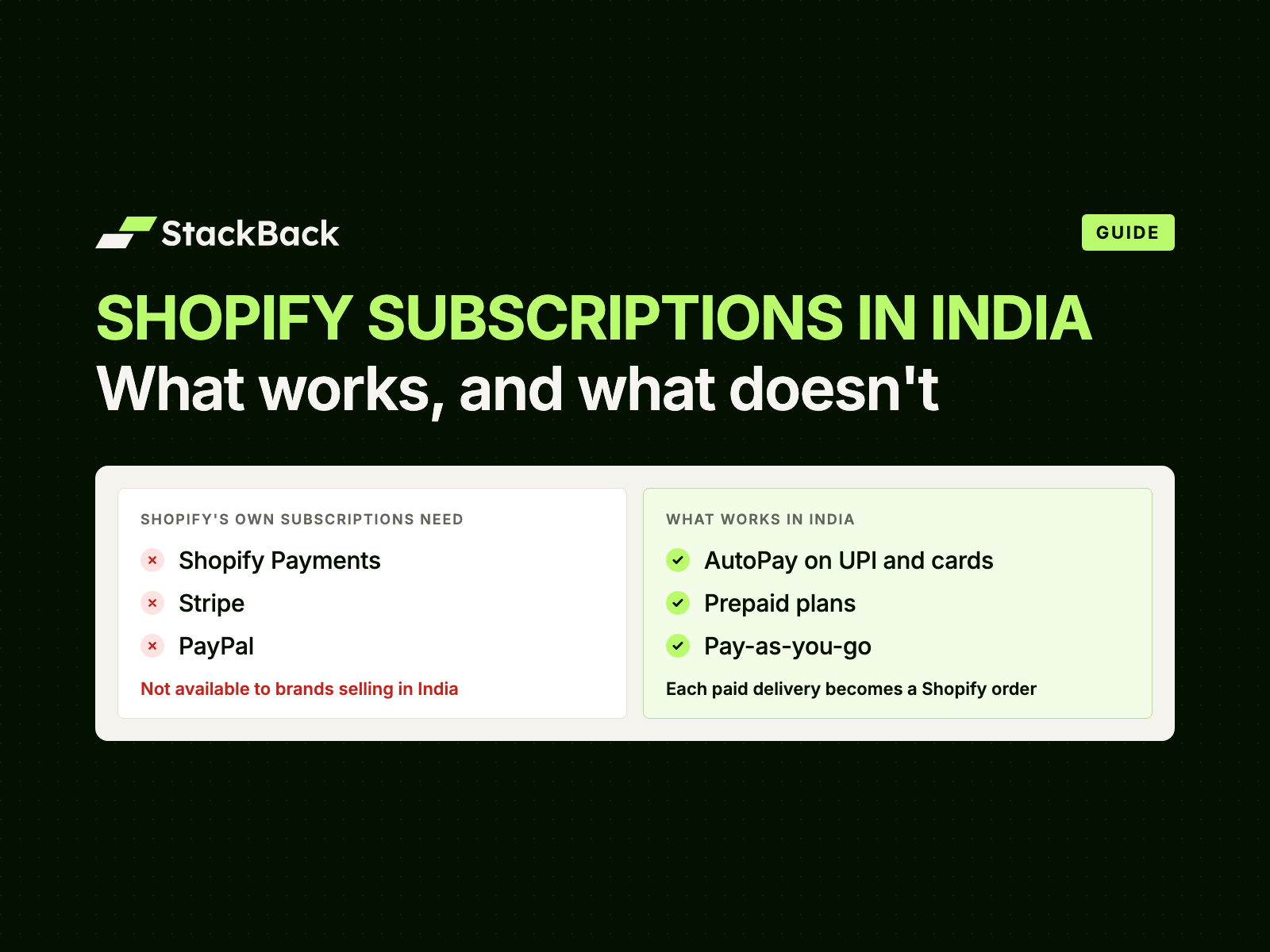
Shopify's own subscriptions need Shopify Payments, PayPal Express, Authorize.net, Adyen or Stripe. None of them are available to brands selling in India, so your subscriptions have to charge through an Indian gateway. Our guide to Shopify subscriptions in India explains why in full.
Check these before step 1:
- A Shopify store selling in India, on any Shopify plan.
- An Indian payment gateway on your checkout, such as Razorpay, Cashfree, PayU or PhonePe Payment Gateway.
- Products your customers reorder every 1 to 8 weeks.
- Stock for at least three deliveries for everyone you plan to invite.
- One person who owns subscriber questions for the first month.
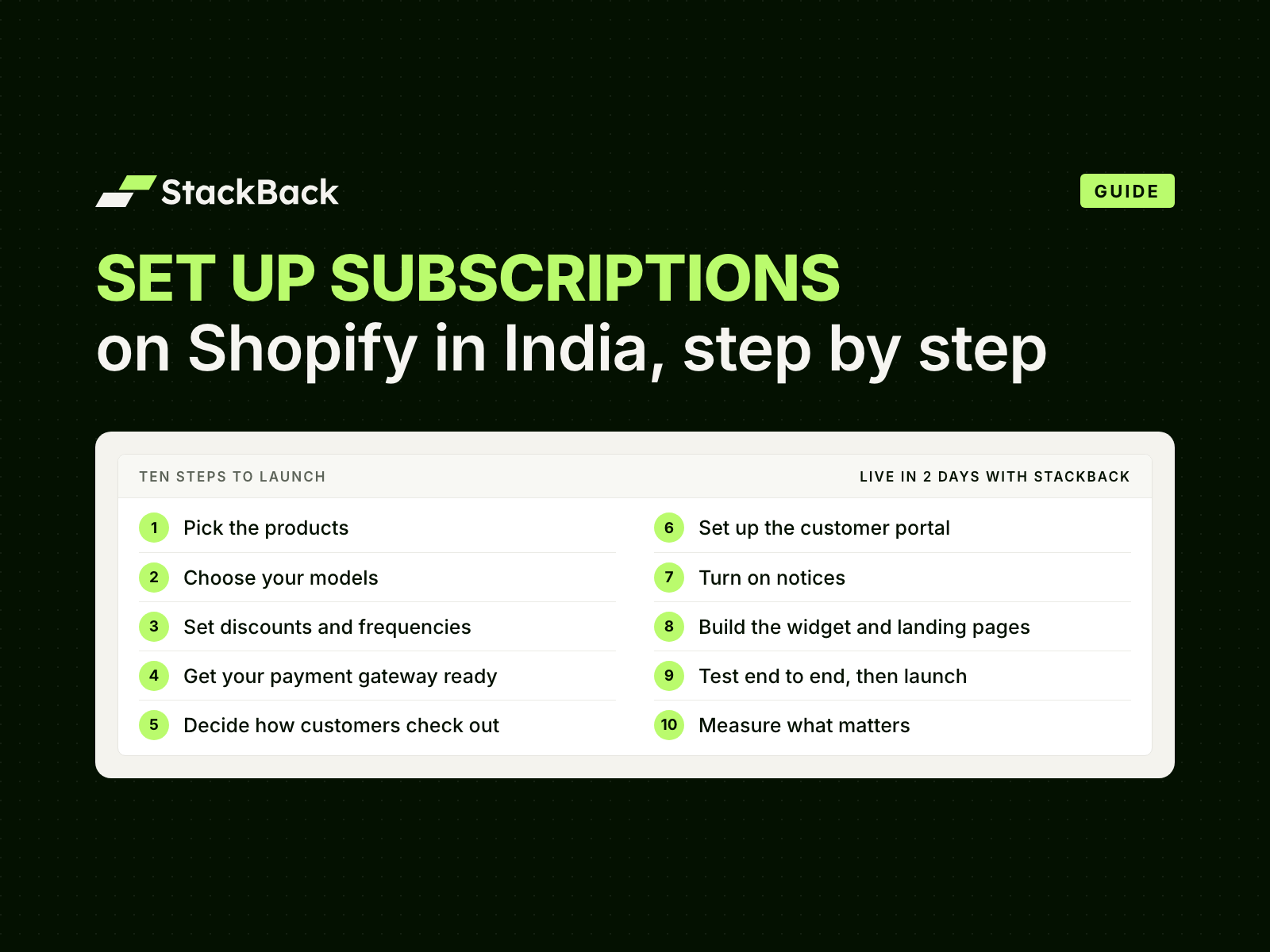
Step 1: Pick the Products to Sell on Subscription
Start where repeat buying already happens.
- Find your repeat buyers. In Shopify, Customers › Segments can list everyone who bought a product twice or more.
- Note the gap between orders. That gap becomes your default delivery frequency.
- Start small. Pick 1 to 3 hero products and one bundle. Bundles and build-your-own boxes can sell on subscription too.
- Leave some out. Skip products bought once a year, products with frequent returns, and stock you can't promise for three months.
Good fits are products used up at a steady pace. Think coffee, tea, protein and supplements, atta, ghee, pet food, diapers and skincare refills.
Step 2: Choose Your Subscription Models
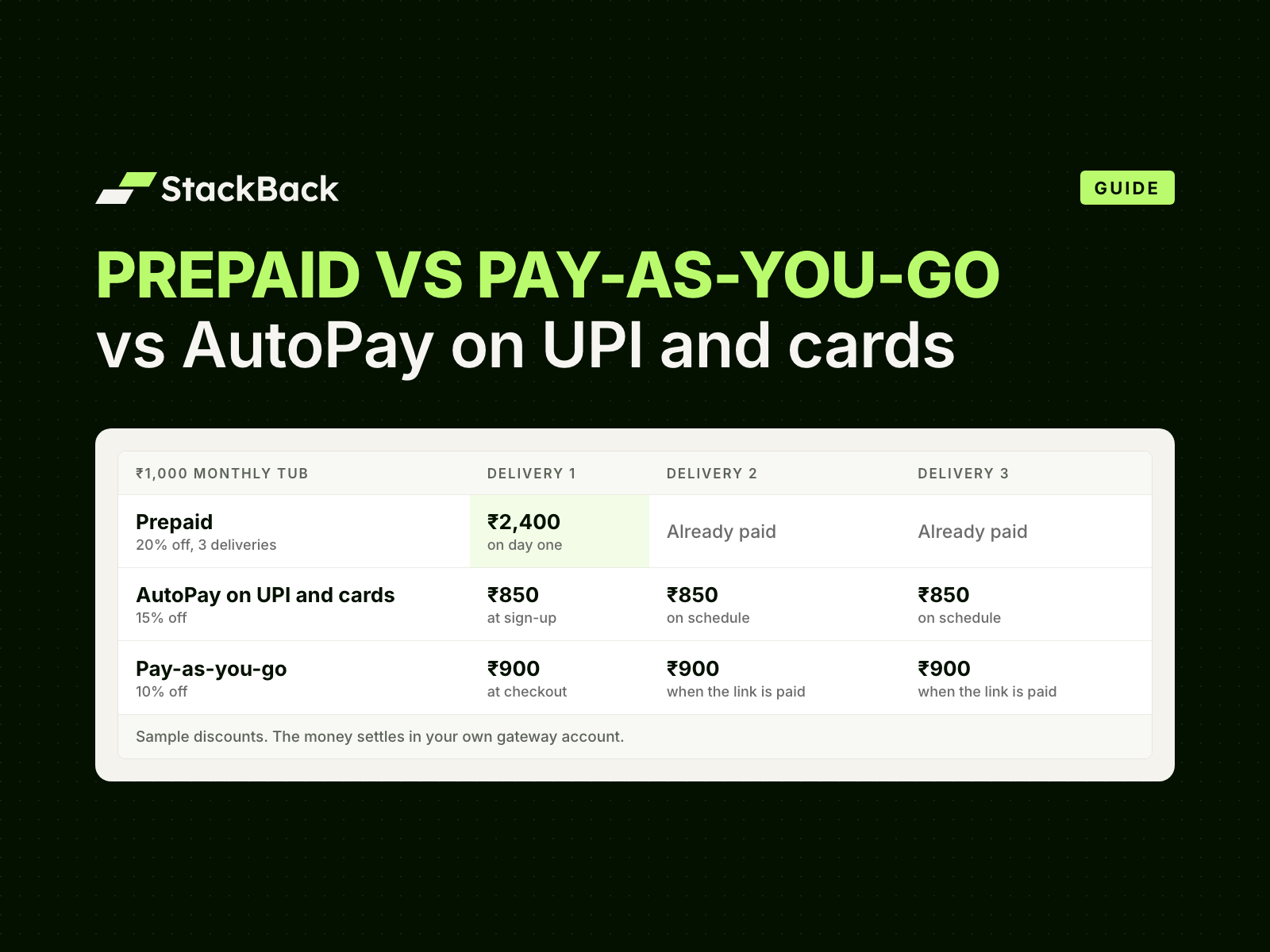
Indian customers pay for subscriptions in three ways:
- Prepaid: pay once for several deliveries.
- Pay-as-you-go: a payment link before each delivery.
- AutoPay on UPI and cards: approve once; each payment is collected on schedule, after a notice.
Start with AutoPay and prepaid. Add pay-as-you-go for first-time and COD-first buyers. Put products above ₹15,000 a delivery on prepaid. Above that amount, AutoPay needs the customer to authenticate each payment.
Our guide to AutoPay vs prepaid vs pay-as-you-go compares the three in full.
Step 3: Set Discounts, Frequencies and Freebies
Frequencies. Match the product's real use:
- daily or weekly drops for milk;
- every 2 weeks for coffee;
- monthly for protein, atta, pet food and supplements.
Offer two or three frequencies, not ten. Customers can change theirs later in the portal.
Discounts. Give the most where the commitment is highest. Prepaid usually gets the biggest discount, then AutoPay, then pay-as-you-go. For reference: The Stack runs prepaid at 35% off, and MillD runs AutoPay at 33% off. Rosier Foods runs prepaid and pay-as-you-go at 25% off. Check the margin on each delivery before you pick a number.
Freebies. Choose a gift and the delivery it comes with: a sample on the 2nd, a gift on the 7th. Show it before they subscribe.
Plan names and length. Name each plan after what the customer gets, such as "3-Month Subscription". Say whether it ends or runs until they cancel.
Step 4: Get Your Payment Gateway Ready
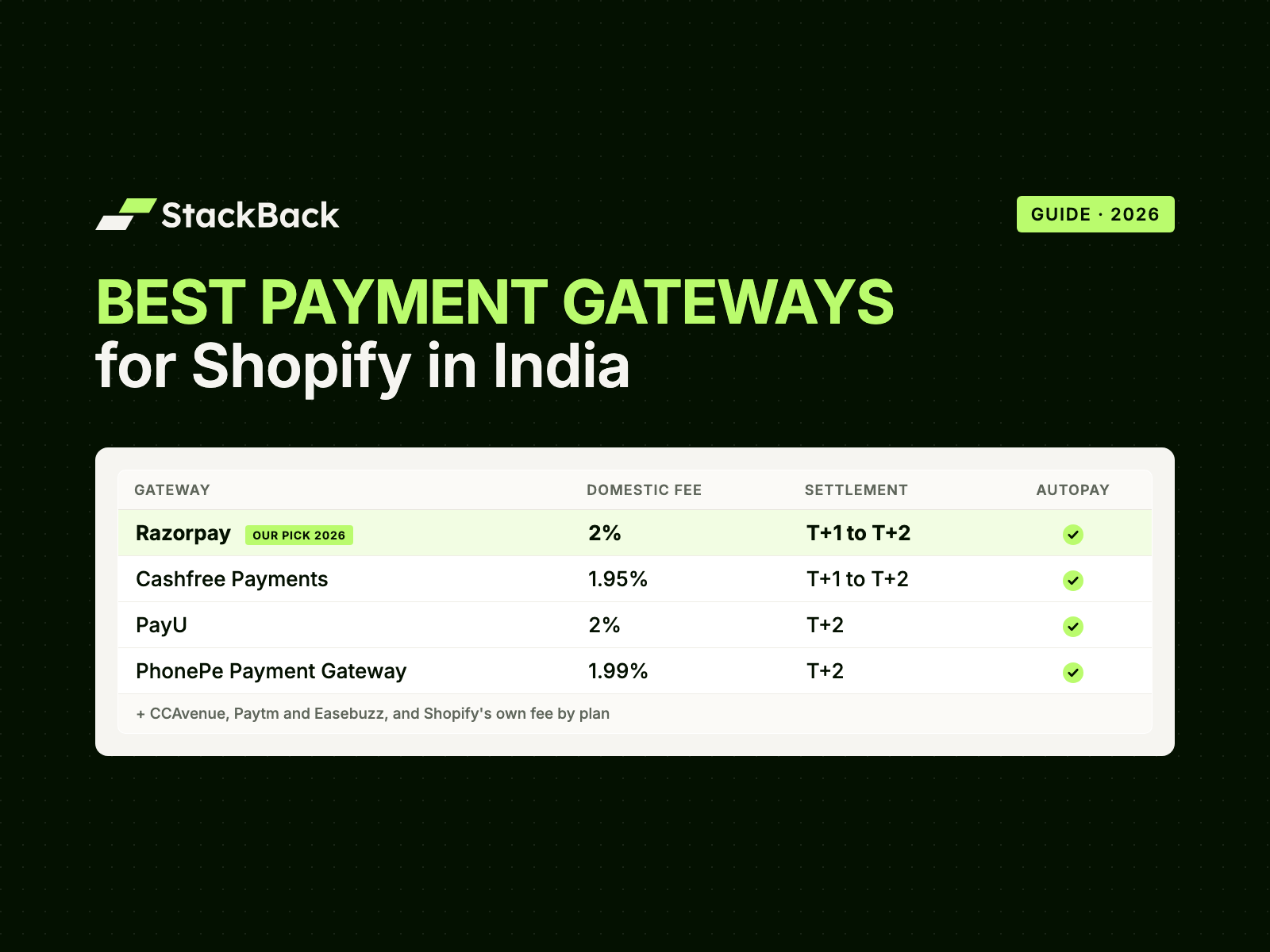
Shopify Payments isn't available in India, so you'll use an Indian gateway. Our guide to the best payment gateways for Shopify in India compares them.
- Prepaid and pay-as-you-go need nothing new. They use whichever gateway is already on your checkout.
- AutoPay needs a gateway account that runs UPI AutoPay and card mandates: Razorpay, Cashfree, PayU or PhonePe.
- One-time orders can stay on the gateway you use today. AutoPay runs alongside, through your own gateway account.
- Check the account. KYC should be complete and the account active. Check the business name on it too: the bank's notice before each AutoPay debit shows the merchant name.
On StackBack, our team handles the gateway setup. StackBack is partnered with Razorpay, so account issues are sorted with Razorpay's team directly. Every payment settles in your own account.
Already on Razorpay, Cashfree, PayU or PhonePe?
Keep the gateway you have. Our team sets up your plans, AutoPay included, and takes you live in 2 days.
Step 5: Decide How Customers Check Out
- Prepaid and pay-as-you-go go into the cart like any product. They check out on your Shopify checkout or a quick checkout: GoKwik, Shopflo, Shiprocket Checkout, Razorpay Magic Checkout, Cashfree or FlexyPe. StackBack is the only subscription platform that works with India's quick checkouts, for these two models. See subscriptions on quick checkouts.
- AutoPay is bought on StackBack's subscription checkout, through your own gateway account. The customer pays for the first delivery and sets up AutoPay in one step.
- Cash on delivery is your call. StackBack supports COD subscriptions, but we advise keeping subscriptions prepaid to avoid RTO.
Step 6: Set Up the Customer Portal
Subscribers should never have to message you to change a delivery. The portal sits on your own domain, with Shopify login. Customers can:
- skip a delivery or pause the subscription;
- swap products or flavours;
- change frequency;
- add products to an upcoming delivery or an active subscription;
- cancel.
Then:
- Add a "Manage subscription" link to your store menu.
- Decide what to offer before a cancellation goes through: a skip, a pause or a discount.
- Keep cancelling simple. India's dark-pattern guidelines (CCPA, 2023) treat a hidden or tiresome cancel option as a "subscription trap".
- Try it yourself: pause, swap and cancel a test subscription.
Step 7: Turn On Notices
Notices stop surprises, and surprise charges lead to cancellations.
- AutoPay: a notice 48–72 hours before every charge, by email and on WhatsApp through your own WhatsApp tool, with a link to manage the subscription. RBI also requires the customer's bank or UPI app to send its own notice at least 24 hours before each debit.
- Pay-as-you-go: a payment link before each delivery, saying what, when and how much.
- Everyone: a welcome message, delivery updates, and a heads-up when a gift is on its way.
Write them in your brand's voice, and put the portal link in every one.
Step 8: Build the Product Page Widget and Landing Pages
Product page. Put the subscription under the price and above the buy button. Keep one-time purchase plain and visible. Show the full charge on the button, with how often and how many deliveries.
Landing pages. Send ads and invitations to a page built for the subscription, not your general product page. On StackBack, every subscription, bundle and festive offer gets a one-click landing page, with the widget already on it.
Our first 100 subscribers playbook covers both layouts in detail.
Step 9: Test End to End, Then Launch
Test. Place a real order on each model, and take one test subscriber through delivery 2. Check that:
- the order appears in Shopify once the delivery is due and paid, tagged Subscription;
- your OMS, 3PL, invoices and reports pick it up like any other order;
- every notice shows the right amount and date;
- skip, swap, pause and cancel all work in the portal.
Launch. Invite your best customers before you spend on ads:
- loyal repeat buyers;
- customers due to reorder;
- lapsed regulars;
- people who buy two of your products.
Then run ads to retargeting and past-buyer audiences, pointing at the landing page. Leave current subscribers out of subscription ads; the Subscription tag on their orders helps you build that list.
Step 10: Measure What Matters
Track a few numbers: weekly in the first month, then monthly.
- Subscribers: people who have paid, not carts, contracts or mandates.
- Take rate: subscribers as a share of buyers of each product.
- Payment success: AutoPay payments collected on the first attempt, and pay-as-you-go links paid.
- Delivery-2 and delivery-3 retention, by model.
- Churn and its reasons: why people skip, pause and cancel.
- LTV and CAC payback for subscribers, against one-time buyers.
Change one thing at a time, so you know what worked. Across brands on StackBack, the average LTV expansion is 3.15×, and CAC payback on subscribers is under 1 month.
Mistakes to Avoid
- Installing Shopify's own subscriptions. They can't charge through Indian gateways.
- Emailing an invoice every cycle. Every payment becomes a new decision, and every unpaid one is a lost subscriber.
- Hiding one-time purchase or pre-selecting the subscription. Customers notice, and the CCPA guidelines call it out.
- Launching without a working portal. Every change becomes a support ticket.
- Discounts that lose money on every delivery. Check margin per box first.
How StackBack Handles This
Integrate StackBack with your Shopify store. Our team sets up your plans, discounts, widgets, portal, notices and landing pages, and takes you live in 2 days. Prepaid, pay-as-you-go and AutoPay on UPI and cards run side by side, on products and bundles.
Each subscription order appears in Shopify once that delivery is due and paid, tagged Subscription: just another order to fulfil. Plans start at ₹4,500/month, with 0% transaction fees on every plan. See pricing.
Frequently Asked Questions
Can you sell subscriptions on Shopify in India?
Yes, through a subscription platform that charges through Indian gateways. Shopify's own subscriptions need Shopify Payments, Stripe, PayPal or similar gateways, none of which are available to brands selling in India.
Do I need Shopify Payments or Shopify Plus?
No. StackBack works on every Shopify plan in India. AutoPay is charged through your own Razorpay, Cashfree, PayU or PhonePe account.
How long does it take to set up subscriptions on Shopify?
With StackBack, our team takes you live in 2 days. We plan the products, models and discounts with you on a call, then set everything up.
Which payment gateway do I need for subscriptions?
Any Indian gateway on your checkout works for prepaid and pay-as-you-go. AutoPay on UPI and cards runs through Razorpay, Cashfree, PayU or PhonePe.
Will subscriptions work with GoKwik or Shopflo?
With StackBack, yes, for prepaid and pay-as-you-go plans. They check out on your quick checkout like any product. AutoPay plans are bought on StackBack's subscription checkout.
Do subscription orders show up in Shopify?
Yes. Each order appears in Shopify once that delivery is due and paid, tagged Subscription. Your team fulfils it like any other order.
Can I move subscribers from another subscription app?
Yes. Our team moves your subscribers from Seal, Appstle and other apps right away, with no gap in deliveries.
Skip the Setup: We Take You Live in 2 Days
Integrate StackBack with your Shopify store. Our team sets up your plans, portal and notices, and takes you live in 2 days.
Sources: Shopify Help Center, Shopify Subscriptions: considerations and Shopify Payments: supported countries, checked 15 October 2026 · Reserve Bank of India, Digital Payments – E-mandate Framework, 2026, 21 April 2026 · Central Consumer Protection Authority, Guidelines for Prevention and Regulation of Dark Patterns, 2023, 30 November 2023